
FeaturesProduct capability
How reception checks patients in and keeps the waiting order
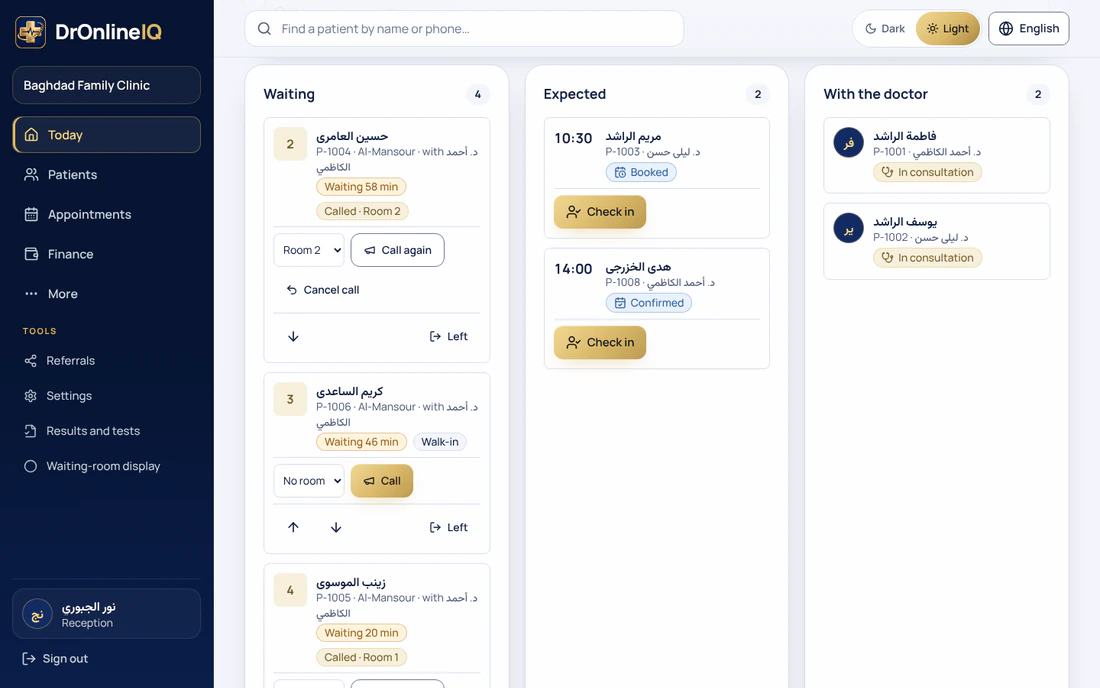
On the Today page reception sees three lists: Expected, Waiting and With the doctor. Pressing Check in gives the patient a ticket number and marks the appointment as arrived. The order follows arrival time, any manual change is logged, and only the doctor starts and finishes a consultation.
Create a free 14-day trial account with demonstration data, or ask for a demo. Do not enter real patient data during the trial.
Who it serves and what it solves
A busy front desk with two screens
When two staff members check in two patients in the same second, each patient gets a different number. This was tested with thirty simultaneous check-ins on real PostgreSQL: the tickets came out as 1 to 30, with no repeats and no gaps.
A clinic with several branches
Each branch has its own numbering every day, and Today can show one branch or all of them.
A patient who gets checked in twice
If a patient who is still in the queue is checked in again the same day, the system returns the first ticket and does not make a new one. After the visit is done they can be checked in again with a new number.
A doctor who needs to know who is next
As soon as the check-in is recorded, the patient shows to the doctor as the next patient, and only the doctor starts and finishes the consultation.
A realistic day
Morning: who is coming today
Expected lists today's appointments whose patients have not arrived, whether staff booked them or patients booked online. A late appointment carries a Late mark.
The patient arrives
Reception finds the line (or searches by name) and presses Check in. The patient moves to Waiting with a ticket number and the minutes waited, and the appointment becomes arrived.
The order changes
If a patient has to go earlier or later, reception presses Move up or Move down. The log records the order of tickets before and after the change, and the ticket numbers themselves never change.
The doctor starts
When the doctor starts the consultation the patient moves to With the doctor and the appointment becomes in progress. When the doctor finishes, the appointment becomes completed and the patient leaves the lists.
Someone leaves before being seen
If a patient goes home while waiting, reception presses Left. They leave the queue and that stays in the log.
Who does what
- Reception
- Checks patients in, moves them up or down the queue, and removes someone who left without being seen.
- Practitioner
- Sees the current and the next patient, and starts and finishes the consultation. Reception does not do this.
What the product does today
A Today page with three lists: Expected (with a Late mark), Waiting (ticket number and minutes waited) and With the doctor. With several branches the lists filter by one branch or all of them.
Queue and check-inCheck-in numbers patients per branch and per day. A number is never repeated, even with simultaneous check-ins, and checking in again a patient who is still in the queue returns the same number.
The order follows arrival time. Move up and Move down change a waiting patient's place, and the order before and after is kept in the log; the ticket number itself does not change.
Starting and finishing a consultation belong to the doctor alone, and they move the appointment to in progress and then completed. The Left button takes out someone who left before being seen.
The states a ticket moves through
These are the states the system shows today. Each move between them is made by a specific role in the clinic.
- Waiting: checked in, with a ticket number and minutes waited
- Called: reception called the ticket to a room on the waiting-room screen, only if the clinic uses one; the call can be cancelled to put the patient back to Waiting
- With the doctor: the doctor started the consultation and the appointment is in progress
- Done: the doctor finished and the appointment is completed
- Left: reception recorded that the patient left before being seen
Inside the product
Demonstration data: no real name, phone number or patient.
The waiting-room screen: the ticket being called in large digits with its room, the other called ticket, the next tickets and the number waiting. No patient names appear.
Setting up and moving over
- The queue needs no extra hardware: it runs from the Today page on the reception computer or phone, and needs an internet connection.
- Check-in is recorded from an appointment line under Expected. A patient who arrives without an appointment is booked first with New appointment, then checked in.
- If you use paper numbers or a name book today, leave the numbering to the system: it gives the next number automatically for each branch and each day.
- Showing the numbers on a screen in the waiting room means setting up rooms and a screen separately; that is the subject of the waiting-room screen page.
Limits worth knowing
- Staff do the check-in from the Today page; we do not describe a check-in the patient does on their own.
- The minutes shown are minutes already waited, not a promise of when someone will go in.
- The queue does not message patients. A call shows on the waiting-room screen if the clinic has set one up.
- We do not describe printing ticket slips.
Questions
Do ticket numbers start again every day?
Yes. The counter is per clinic, branch and day, so every branch starts at 1 each day. Only tickets in today's queue can be called.
What if two staff check in two patients at once?
Each patient gets a different number. The database runs the step that raises the number under one lock, one after another, so there is no read-then-write that two check-ins could share.
Can reception reorder the people waiting?
Yes, by moving a patient up or down among those waiting. The log records who did it and the order before and after. Starting and finishing a consultation is for the doctor only.
What about a patient with no appointment?
Book one first with New appointment, then check them in from the Expected list like anyone else.
Can staff at another clinic see our queue?
No. Everything in the queue is scoped to the clinic of the session, and an id that belongs to another clinic is treated as not found.
Price
Plans are annual. Prices are read from the same list that checkout uses.
Essential
499,000 IQD
/ year
Professional
699,000 IQD
/ year
Business
1,200,000 IQD
/ year
Enterprise
By agreement
How-to guides
Try it in your own practice
Create a free 14-day trial account with demonstration data, or ask for a demo. Do not enter real patient data during the trial.
Content last updated: 2026-10-24