
FeaturesProduct capability
A public page for each doctor, written by the doctor and approved by the clinic owner
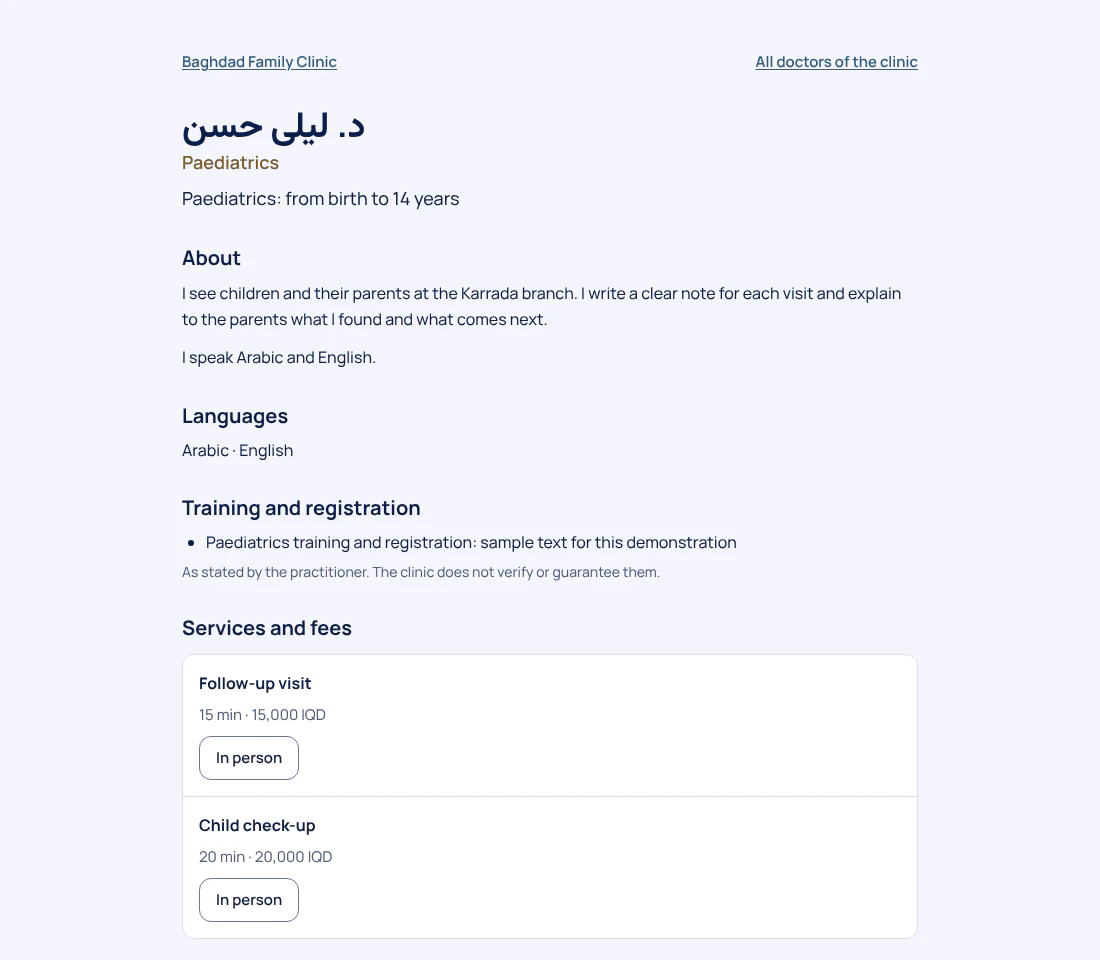
In DrOnlineIQ every doctor can have a public page that the doctor drafts and that visitors cannot see until the clinic owner publishes it. It shows only what the clinic wrote: name, headline, specialty, about text, languages, credentials as the doctor stated them, and a photo. There are no ratings, reviews, or invented hours or prices, and it has a Book button when online booking is switched on.
Create a free 14-day trial account with demonstration data, or ask for a demo. Do not enter real patient data during the trial.
Who it serves and what it solves
A doctor who wants a page in their own words
The doctor writes their name, a one-line headline and an about text in any of the four languages. Nobody writes it for them, and the words are never machine-translated.
An owner who does not want anything online without approval
Visitors cannot see the draft. Only the owner publishes or unpublishes the page, and after publishing, the doctor's edits do not change what people see until the owner publishes again.
A clinic that shares a link or a QR code
The page has a fixed address made of lowercase Latin letters, digits and hyphens, and a QR code for a card or a sign opens the page once it is published.
A patient who wants to book straight from the doctor's page
The page lists the doctor's services with their duration and price when one is set, and the Book button leads to the online booking page with this doctor chosen. If booking is off, the page offers a phone call to the clinic instead.
A realistic day
The doctor writes a draft
Under More, then Doctor page, the doctor presses Start my page, writes the name, headline, specialty, about text, languages and credentials, adds a photo and saves. Visitors still see nothing.
The owner reviews
The owner opens the doctor's page and presses Preview draft. The preview is for staff only and search engines do not index it.
The owner publishes
The owner presses Publish page. It needs the name and at least a headline, a specialty, an about text or one credential. The page is then reachable by its address and QR code.
A patient opens the page
The patient scans the code or opens the link, reads the introduction and the services, and presses Book an appointment, which goes to the online booking page for this doctor.
A later edit
When the doctor edits the draft, Changes not published yet appears and the button becomes Publish changes. Visitors keep seeing the previously published text until the owner presses it.
Who does what
- Practitioner
- Writes the draft of their page, adds their photo and edits both. Cannot publish it themselves.
- Owner
- Edits any doctor's draft in the clinic, and alone publishes or unpublishes the page or changes its address (which is locked while published).
What the product does today
A draft the doctor writes and a publication the owner decides. The published page is a fixed copy kept apart from the draft, so visitors never see half-written text.
The doctor's public pageThe page shows only what the clinic entered: the name as written, a headline, specialty, about text, languages, credentials shown as “stated by the practitioner” which the clinic does not verify, and a photo. No ratings, reviews, “verified” badges, or hours and prices that were not written.
The text is written in any of the four languages. A visitor sees it in their own language if you wrote it, otherwise in another language you wrote, with that language named. There is no machine translation.
The doctor's services with duration and price (or “Price: ask the clinic”), their branches, a Book an appointment button that leads to online booking, and a reminder that the page is for introductions and booking, not for emergencies.
The doctor's public pageA draft, an unpublished page, a deactivated doctor, and a clinic whose public page or subscription is off all give the same “not found”. Only published pages of a clinic with an active subscription go into the sitemap and the structured data (JSON-LD).
What the public page is made of
These are the fields a doctor really writes, with their limits as they are in the product.
- A name patients see exactly as written (up to 120 characters); the product adds no title to it
- A headline of up to 140 characters and a specialty of up to 80
- A plain-text about section of up to 2000 characters: paragraphs separated by a blank line, no links, no formatting
- The languages the doctor speaks, from Arabic, Kurdish, Persian, English and Turkish
- Up to 10 lines about training and registration, shown as stated by the practitioner
- A JPEG, PNG or WebP photo up to 5 MB, re-processed so its location and camera details are removed
Setting up and moving over
- Each page needs an account with the doctor role, and the clinic's own public page must be on. If the clinic's page is switched off, its doctors' pages do not open.
- For the Book button to appear, switch on online booking and set the doctor's hours and services (see the scheduling and booking page). Otherwise the page shows a Call the clinic button.
- There is no import from Facebook or from a CV file: the doctor types the text into the fields. We do not write ready-made text in their name.
- If a waiting-room screen is in use, the doctor's public name can show on it, with a switch in the screen's settings and only when the doctor's page is published.
Limits worth knowing
- The clinic does not verify names, titles or credentials. The page is as true as what its author wrote, and credentials are shown as their own statement.
- Plain text only: no links, formatting or HTML. Photos are shown as uploaded, without any badge.
- Pages are offered to search engines only for a clinic with an active subscription; pages of a trial clinic open by link. We make no promise about search ranking.
- There are no ratings, reviews, patient counts or calculated years of experience, because the product keeps none of them.
Questions
Who decides what goes live?
The doctor writes the draft and only the owner presses Publish page. A doctor cannot publish their own page, and only the owner can unpublish it.
If I edit the page after publishing, do people see the change at once?
No. Visitors see the published version. Changes not published yet is shown on the page until the owner presses Publish changes.
Does the page show patient ratings?
No. The product has no ratings, reviews or badges. Only what the clinic wrote is shown.
What happens to the page of a doctor we unpublish or deactivate?
It stops existing for visitors: they get the same “not found” page as for any unknown address, so nobody can tell whether the address ever existed. It also leaves the sitemap and the structured data.
Does the site show the doctor's photo with its location data?
No. The photo is re-processed on upload, which removes its location and camera details. The photo is public once the page is published, so choose it with care.
Price
Plans are annual. Prices are read from the same list that checkout uses.
Essential
499,000 IQD
/ year
Professional
699,000 IQD
/ year
Business
1,200,000 IQD
/ year
Enterprise
By agreement
How-to guides
Try it in your own practice
Create a free 14-day trial account with demonstration data, or ask for a demo. Do not enter real patient data during the trial.
Content last updated: 2026-10-24